DSH canvas · AI Agent Design · v1 · 2026 · 2 hours

The AI Agent Design Canvas

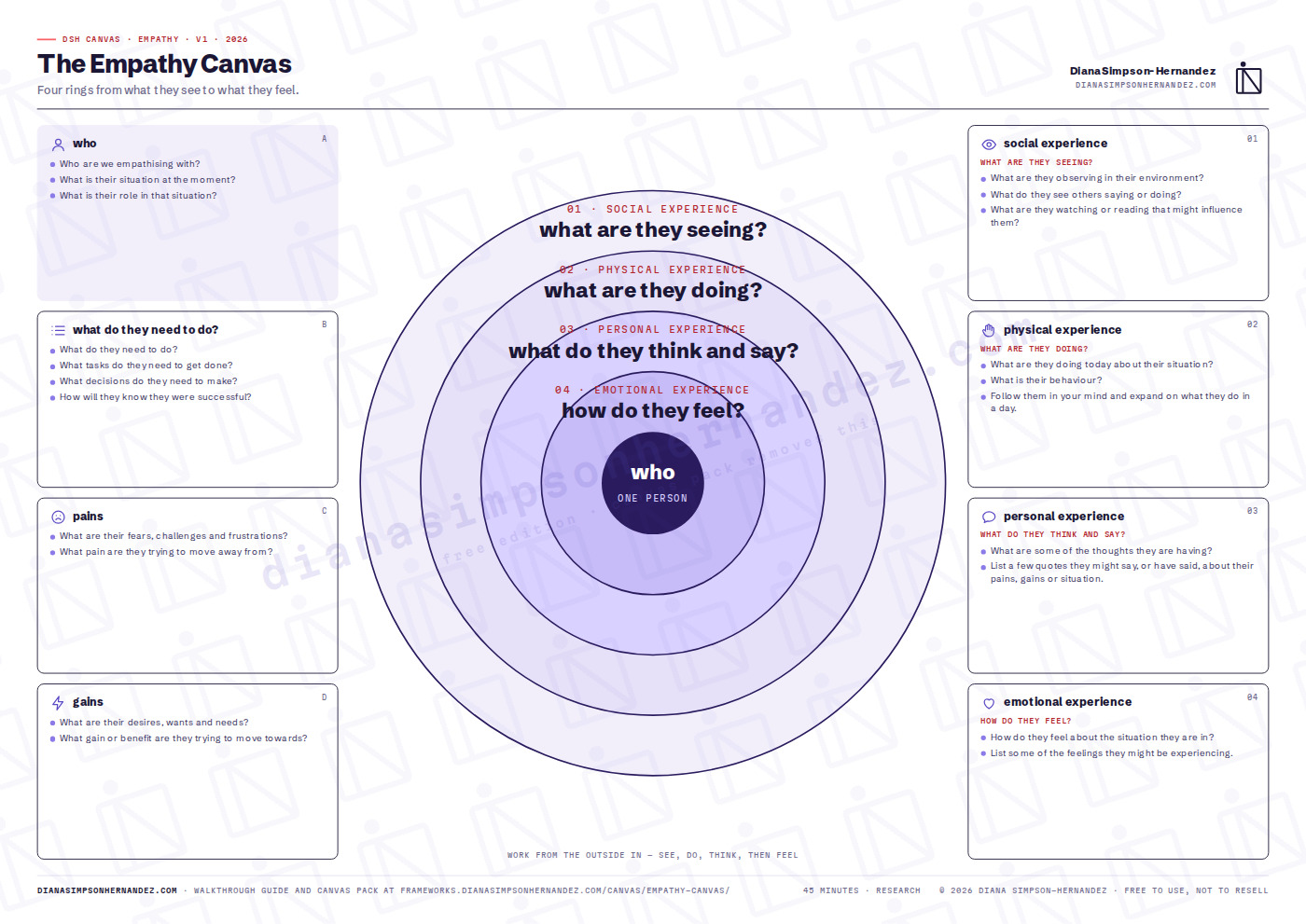
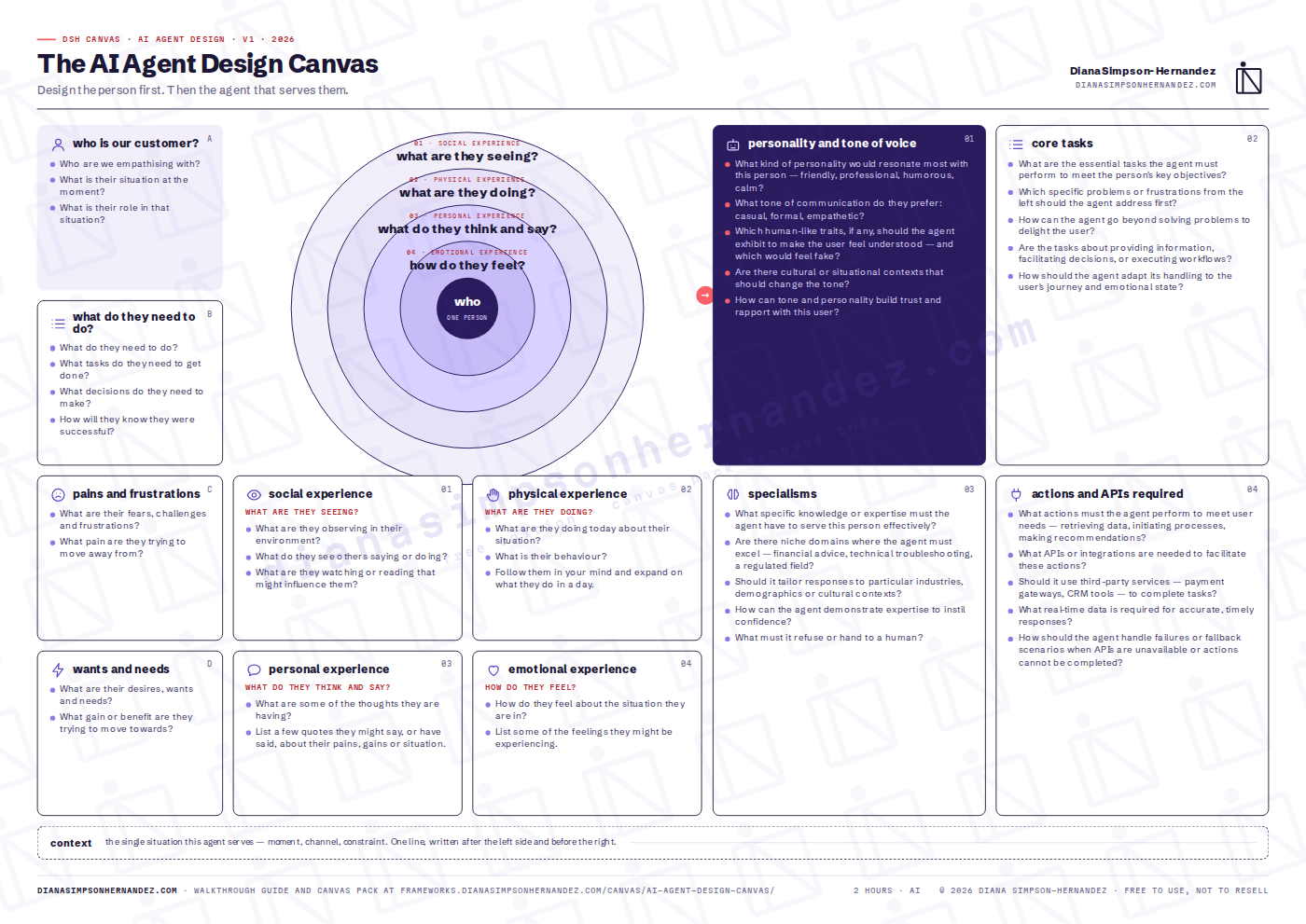
Design the person first. Then the agent that serves them. The empathy canvas on the left, your agent on the right. Who the customer is, what they need, their pains and wants, their four rings of experience — then the agent's personality and tone, core tasks, specialisms, and the actions and APIs it needs.

AIAgentsProductFree · watermarkedPack · clean + 4K PNG
The AI Agent Design Canvas — preview
What it does

Why this canvas exists

Most AI agents are specified from the model outwards: pick a model, write a system prompt, bolt on tools, then discover in testing that nobody wanted to talk to it. This canvas reverses the order. The left half is the empathy canvas — a real person, their tasks, their pains and wants, and the four rings of what they see, do, think and feel. Only when that is on the board do you move right and design the agent: the personality and tone that person would trust, the core tasks in priority order, the specialisms it must have (and the things it must refuse), and finally the actions, APIs and fallbacks that make it real. The arrow between the halves is the point of the canvas: everything on the right must be traceable to something on the left.

Reach for it when
  • Before writing the first system prompt for a customer-facing agent, assistant or copilot.
  • When an existing agent has good accuracy and poor adoption — usually a personality or task-priority problem, not a model problem.
  • As the shared specification between product, design and engineering, so the prompt, the UI and the integrations are built from one document.

Built for: Teams specifying a customer-facing AI agent, assistant or copilot — before the first prompt is written.

On the canvas

What you fill in

Work the boxes in the numbered order. The order is the method.

01

who is our customer?

Who are we empathising with?

02

what do they need to do?

What do they need to do?

03

pains and frustrations

What are their fears, challenges and frustrations?

04

wants and needs

What are their desires, wants and needs?

05

the four rings

See, do, think and say, feel — worked from the outside in.

06

personality and tone of voice

What kind of personality would resonate most with this person — friendly, professional, humorous, calm?

07

core tasks

What are the essential tasks the agent must perform to meet the person's key objectives?

08

specialisms

What specific knowledge or expertise must the agent have to serve this person effectively?

09

actions and APIs required

What actions must the agent perform to meet user needs — retrieving data, initiating processes, making recommendations?

Get it

Free edition, or the pack

The free edition is the whole canvas — nothing held back except the watermark. The pack is for people who will run it more than once and want it clean, in Miro, with the full guide.

Free edition

Download and run it today£0

The full canvas at A3 with every prompt, and a two-page quick guide. Watermarked with the DSH mark, otherwise complete.

  • The AI Agent Design Canvas — A3 PDF, watermarked
  • Quick guide — what it is, when to use it, the box-by-box short version
  • No email required

Print at A3 landscape. Or open the PDF in Miro / FigJam as a board background.

Box by box

The short version

The full guide in the pack adds what good looks like for each box, a worked example, the agenda and the mistakes.

01who is our customer? · what do they need to do? · pains · wants — Run the left column as you would the Empathy Canvas: one person, their tasks and success criterion, what they fear and what they want.
02the four rings — Outside in: what they see, what they do, what they think and say, how they feel. Refuse to write feelings until behaviour is down.
03context — Write the single situation the agent serves. One line.
04personality and tone of voice — Choose the personality this person would trust in this moment. Name the traits to show, the ones to avoid, and how tone changes with their state.
05core tasks — List the tasks in the order they relieve the pains on the left. Mark each as inform, decide or execute.
06specialisms — The knowledge it must have, the domains it must excel in, how it shows expertise, and what it must refuse or hand to a human.
07actions and APIs required — For each task: the action, the integration behind it, the real-time data it needs, and what happens when it fails.
What next

After the canvas

The completed right-hand side maps directly onto a system prompt (personality, specialisms, refusals), a task backlog (core tasks) and an integration plan (actions and APIs). If the agent will be judged on decisions rather than answers, read the LEVER method for how to measure whether it made them better.

Can I use this with clients?

Yes — both editions. Run it in your workshops, your company and your client work. The one thing you can't do is resell the files or upload them to template marketplaces.

What does the watermark look like?

A light tiled DSH mark and the site address across the sheet. Prompts, boxes and layout are identical to the pack version. The preview above is the free edition.

Miro or FigJam?

The pack includes a 4K PNG of each canvas. Drop it on a board, lock it, and put sticky notes on top.

Do I get updates?

Pack buyers get every new version of every canvas by email. The free edition is always the current version on this page.

The collection

The other canvases